Document-first Android launcher that brings PDFs to your home screen
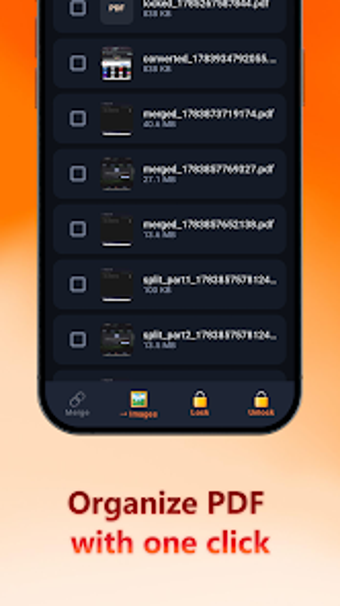
Experience AlignBox - Doc Launcher by Jining Ruiyun Network Technology Co. Ltd, an Android utility that replaces the home screen to surface documents immediately. The app scans paper to PDF, merges and converts files, and centralizes existing documents into a single library. Key tools include a camera-based PDF scanner, on-device conversion and a built-in reader, aimed at mobile users who manage PDFs frequently and want rapid, local access to files.
What does AlignBox actually provide on a device?
The app is a hybrid launcher and document manager that places document access on the home screen, using the device camera to create PDFs, and offering convert-and-merge tools to combine files. It also scans the device for existing PDFs and collects them into one library, so users do not need to open multiple folders or separate apps to reach recent paperwork.
How does AlignBox behave while processing files?
AlignBox performs all scanning and file manipulation on the phone, which the developer describes as on-device processing; this keeps data local and avoids cloud transfers. Because it is described as a lightweight utility, the design targets modest resource use while running as the default launcher, but users should note it replaces the system home screen during regular use.
Is AlignBox safe to operate without extra configuration?
The tool requires no account setup and stores documents locally, reducing external permission surfaces compared with cloud-backed services. The built-in reader and local conversion reduce the need to hand files to other apps. Users must still verify storage and camera permissions at install, since the scanner and local library require those capabilities to work correctly.
Do I need technical knowledge to run AlignBox effectively?
The app is described as zero-friction and minimalist, which helps non-technical users start scanning and opening PDFs quickly. In addition, the convert-and-merge functions provide more manual control for users who combine pages or change formats, so those features require basic familiarity with document workflows to avoid accidental file edits.
Practical judgement and who benefits most
AlignBox suits mobile users who want rapid, local access to PDFs without signing into services; its document-first home screen is practical for repeat scanning and reading tasks. A clear caveat is that the app is ad-supported, which can interrupt a distraction-minimizing launcher experience. For anyone prioritizing local privacy and fast document retrieval, AlignBox is a focused choice with that trade-off in mind.